Introduction
Recently, I have been using OpenClaw extensively, spending several hours interacting with it daily, and I have gradually developed some insights. Many users claim that OpenClaw is not user-friendly, so I want to discuss the reasons behind this perception and delve into a core issue that I believe most people overlook: the essence of why OpenClaw gets better with use.
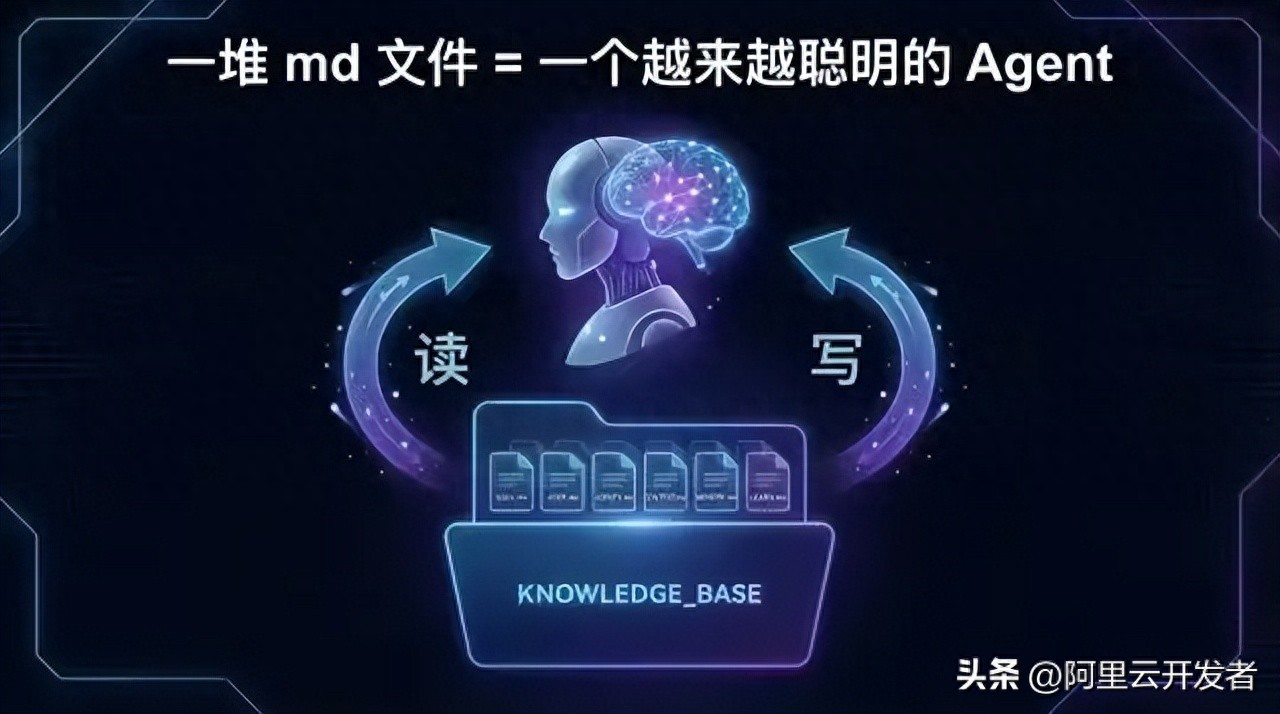
The conclusion is simple: it’s a bunch of markdown files.
This is not a joke; it is my judgment after reading its source code. Let’s elaborate.
Why Many People Find OpenClaw Difficult to Use
Before discussing the core mechanism, let’s rule out some common “usage issues.” Many complaints about usability stem not from the product itself but from incorrect usage.
1. Wrong Model Selection
The impact of the model on the output quality is decisive. The same instructions can yield vastly different results depending on the model used.
The key understanding here is that OpenClaw does not generate intelligence itself; it is a framework that enables AI models to perform better. No matter how good the framework is, if the underlying model is inadequate, the upper limit is constrained. It’s like giving a detailed manual to an intern; they might still struggle, whereas a senior engineer could exceed expectations with the same manual.
2. Treating the Agent as a Generalist
Many users configure a single agent to handle everything: coding, writing copy, and data analysis.
In reality, not every company has employees who are generalists. Each expert specializes in one or more fields. The same applies to AI agents.
OpenClaw supports a multi-agent architecture, allowing you to configure multiple agents, each responsible for a specific domain. Moreover, from a coding perspective, this is not just about “division of labor”—each agent has its own workspace directory, independent memory database, and session history. This means that an agent dedicated to code review accumulates experiences solely related to that task, without being polluted by conversations about writing weekly reports.
This is akin to having each employee in a company focus on a specific area, enabling them to accumulate deep, vertical experience rather than shallow, horizontal knowledge.
3. Not Training Your Agent
This is the part I want to emphasize.
Many users install OpenClaw and use it right away, expecting great results, only to conclude that it is ineffective. But consider this: if you hire a new employee, would you expect them to perform at the same level as someone with three years of experience on their first day?
Agents need training. You must engage in conversations with them, communicate your preferences, and help them understand your work context, solidifying experiences together. In OpenClaw terminology, this process is called “forming SOPs,” or more technically, accumulating workspace files.
This is the core mechanism behind why OpenClaw gets better with use, and it is the focus of this article.
Core Mechanism: A Self-Evolving Markdown File System
I read OpenClaw’s source code and clarified the entire mechanism of “getting better with use.” In simple terms, its architecture can be summarized as:
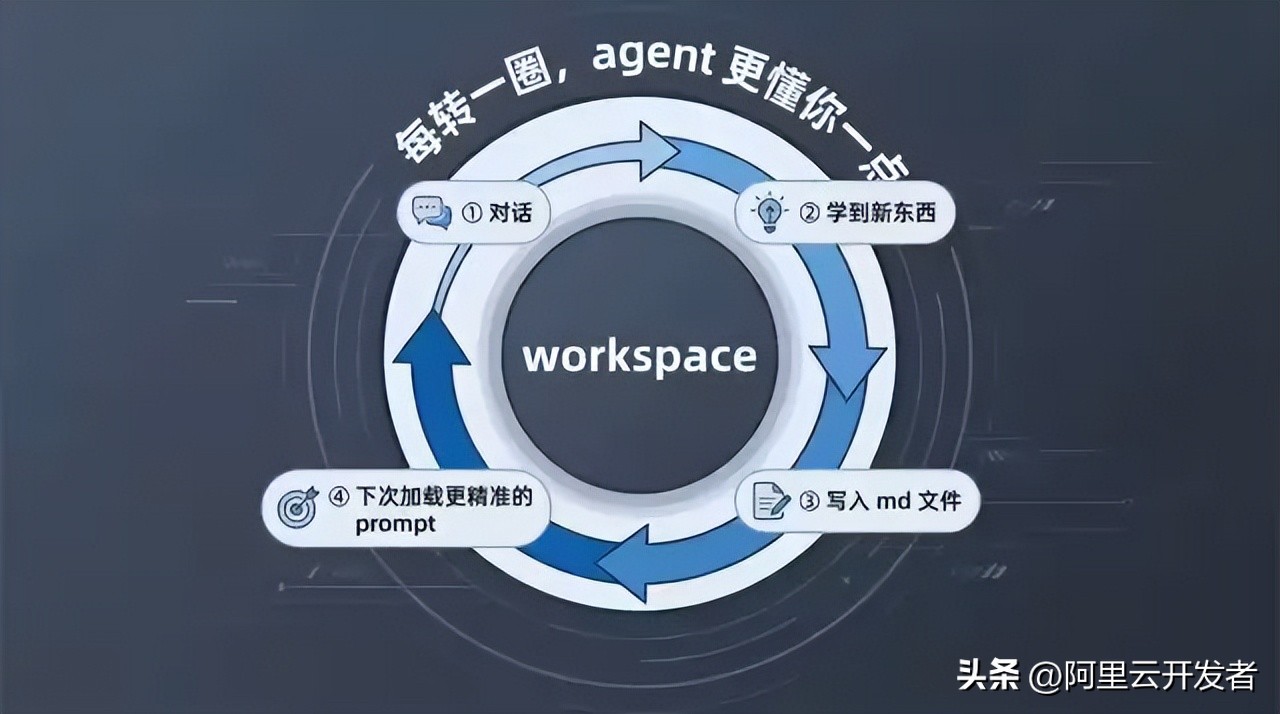
Before each conversation, a bunch of markdown files are combined into the prompt; after the conversation, the agent writes new learnings back into these markdown files.
It’s that simple. But this straightforward loop constitutes a powerful flywheel.
Structure: Seven Core Markdown Files
OpenClaw predefines seven types of core files for each agent’s workspace:
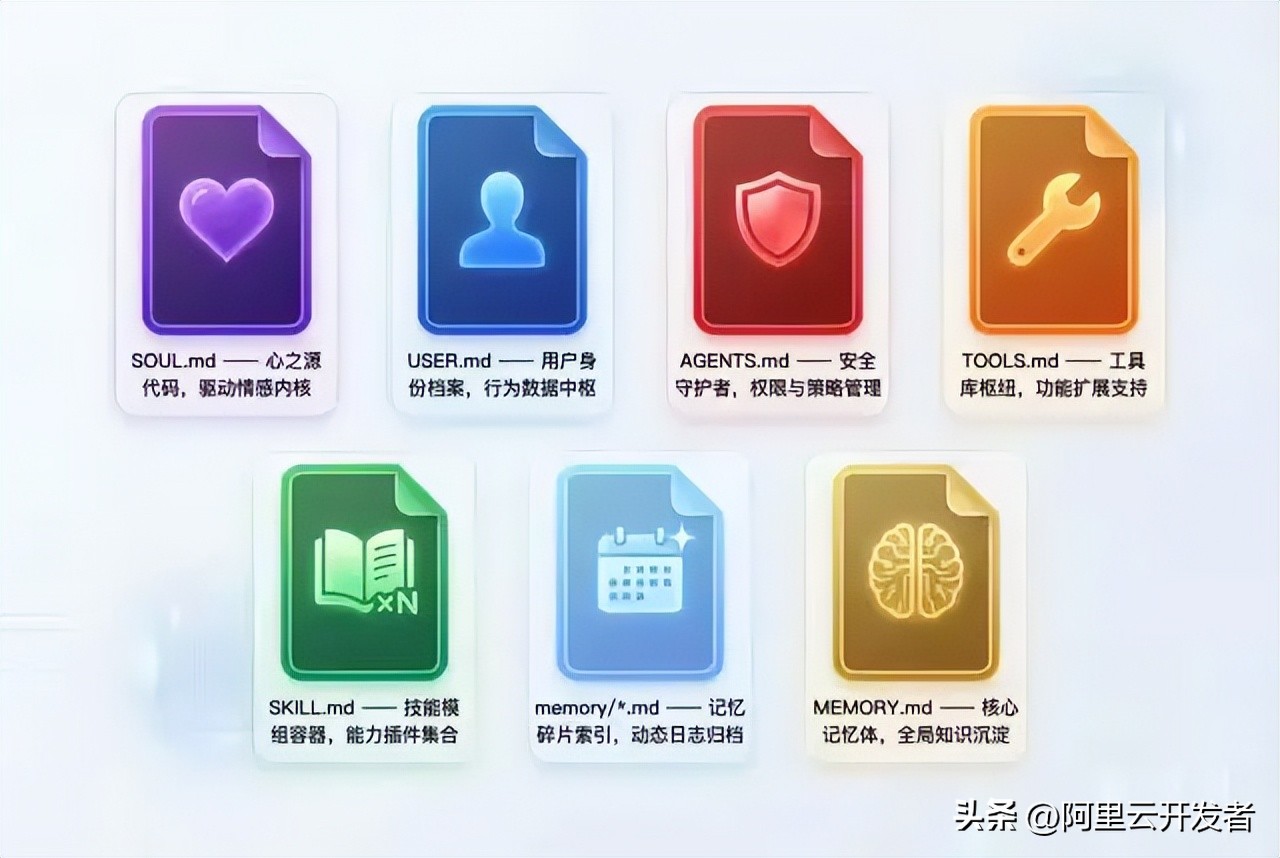
1. SOUL.md — Who the Agent Is
This file defines the agent’s personality: tone, style, boundaries, and values. Interestingly, the template includes a line: “This file is yours to evolve. As you learn who you are, update it.” This means that the agent’s “personality” is not fixed; it adjusts itself gradually through interactions with you. If it discovers that you prefer concise and direct answers, it will write this preference into its soul file.
2. USER.md — Who the User Is
This file contains the agent’s profile of you: your name, time zone, work habits, technical preferences, and communication style. Each time the agent learns new information about you during conversations, it updates this file. The longer you use it, the more accurate this profile becomes, and the better the agent understands you.
3. AGENTS.md — Rules and Lessons Learned
This is the most critical file. It defines the agent’s behavioral norms and, more importantly, records all the mistakes made.
I saw in the source code that the template includes clear instructions: “When you learn a lesson → update AGENTS.md” and “When you make a mistake → document it so future-you doesn’t repeat it.”
In simpler terms: if you make a mistake, write it down so that you won’t repeat it in the future.
This is why OpenClaw gets better with use—not because the model becomes smarter, but because the records in AGENTS.md accumulate over time. Each entry represents an experience gained from a mistake, solidified into a line of text that remains effective forever.
4. TOOLS.md — Environmental Reminders
This file records your work environment: SSH hostnames, camera device names, file path habits, etc. The agent updates this after encountering issues.
5. SKILL.md × N — Operation Manuals for Various Fields
Each SKILL.md defines operational norms for a specific domain. OpenClaw comes with 52 built-in skills covering GitHub issue management, email handling, health checks, code reviews, etc.
More importantly, you can write your own skills. For instance, if you need to produce a weekly report in a specific format, you can document the format requirements, data sources, and output templates in a SKILL.md and place it in the workspace. From then on, the agent will generate weekly reports according to this specification without needing you to describe it each time.
Skills have a priority system: built-in skills have the lowest priority, while user-defined skills in the workspace have the highest. This means you can override any built-in skill behavior.
6. memory/*.md — Daily Memories
The agent writes a date-named markdown file each day, recording key points from conversations, tasks completed, and lessons learned. These files are indexed into an SQLite database, supporting full-text search and vector retrieval.
7. MEMORY.md — Extracted Long-Term Memory
The agent periodically extracts important content from daily memory files into this file. It serves as a distilled summary from the diary. This file is loaded into the prompt during every conversation, so the agent’s “long-term memory” resides here.
Flesh: Custom Files Grown by User and Agent Together
The seven types of files above are the predefined framework. However, the workspace is essentially a regular folder, and the agent has file read/write capabilities, allowing it to create any files and directories it needs.
For example, an agent managing your projects might develop a structure like this over time:
workspace/
├── SOUL.md
├── USER.md
├── AGENTS.md
├── TOOLS.md
├── MEMORY.md
├── memory/
│   ├── 2026-03-01.md
│   └── 2026-03-02.md
├── projects/
│   ├── project-alpha/
│   │   ├── progress.md
│   │   ├── decisions.md
│   │   └── risks.md
│   └── project-beta/
│       └── progress.md
├── templates/
│   ├── weekly-report.md
│   └── meeting-notes.md
└── contacts/
    └── team-preferences.md
These additional files have no schema constraints and are entirely organized by the agent during use. The final form of each agent varies depending on what you discussed, what you did, and in which domains you used it.
This means your agent is genuinely “customized”—not just because you checked a few options in the settings, but because it has developed a knowledge system uniquely suited to you through hundreds of conversations.
Self-Evolving Loop
What I’ve described above are static file structures, but what’s truly interesting is how these files are maintained and updated. OpenClaw has designed a self-evolving loop for the agent:
Conversation starts
  → Load all core markdown files into the system prompt
  → Agent performs a memory search based on user questions
  → Agent executes tasks
  → Learns new things / makes mistakes / discovers new user preferences during the task
  → Agent writes back to relevant files (AGENTS.md / USER.md / memory/*.md / MEMORY.md)
  → File changes trigger memory index rebuilding (SQLite FTS5 + vector indexing)
  → Conversation ends

Next conversation starts
  → Load updated markdown files
  → Search for newly indexed memories
  → Agent's behavior becomes more precise
  → Loop
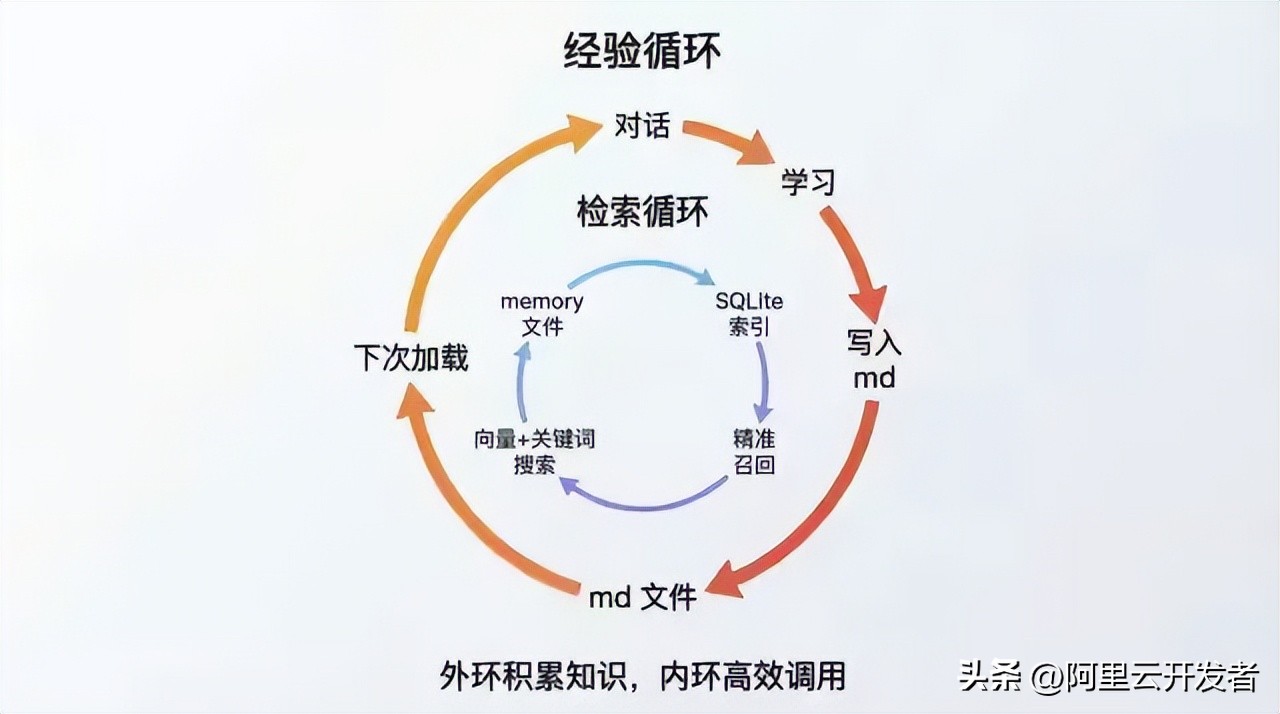
Note that there are two layers of loops:
Outer Loop: Markdown File Read/Write. Each conversation involves loading and updating files. This is the accumulation of “experience”—the agent learns what to do, what not to do, what you like, and what your environment is like.
Inner Loop: Vector Index Retrieval. As memory files accumulate, the agent cannot fit all content into the prompt (due to token limits), so OpenClaw uses a hybrid search engine with SQLite’s FTS5 full-text search and sqlite-vec vector retrieval. Before each conversation, the agent is instructed to search for relevant memories before responding, ensuring that even with hundreds of memory files, it can accurately find related information.
Combining these two loops creates a complete “learning-memory-retrieval-application” system. The storage medium for this system consists entirely of markdown files.
Key Technical Implementation Details
To ensure this article is not just a conceptual discussion, I will highlight a few specific implementation details from the source code to help you understand how practical this mechanism is.
Bootstrap Loading Mechanism
At the start of each conversation, the function resolveBootstrapContextForRun() will:
- Read all core files from the workspace
- Filter based on session type (sub-agents only load a simplified subset)
- Allow plugins to modify content through hooks
- Limit each file to 20KB, with a total limit of 150KB, truncating any excess
This budget mechanism is crucial—it means your markdown files cannot expand indefinitely. If you write too much and too diversely, they will be truncated. Therefore, the agent needs to learn to “distill” and condense the most important experiences within a limited space. This is also why MEMORY.md (extracted long-term memory) and memory/*.md (original diary) are separated.
Memory Hybrid Search
The memory search engine uses a 70% vector similarity and 30% keyword matching hybrid weight, supporting MMR (Maximal Marginal Relevance) diversity and temporal decay. This means that recent memories are weighted more heavily, and the search results aim for diversity, avoiding similar content.
Skill Discovery Priority Chain
Skills are scanned from six sources, with priority from low to high:
- Skills provided by plugins
- Built-in skills
- Hosted skills (~/.openclaw/skills/)
- Personal skills (~/.agents/skills/)
- Project skills ({workspace}/.agents/skills/)
- Workspace skills ({workspace}/skills/)
User workspace skills have the highest priority and can override any built-in behavior. This means you can completely “train” any skill of the agent, and the way to do that is by writing a markdown file.
Self-Destructing Guidance
Upon first use, the agent executes the guidance process in BOOTSTRAP.md to set up IDENTITY.md, USER.md, and SOUL.md. Once completed, the agent is instructed to delete the BOOTSTRAP.md itself. This is a one-time initialization process, and it is no longer needed afterward. The workspace’s state machine records the timestamp of the guidance completion.
Implications
Understanding this mechanism leads to several conclusions:
1. The Value of Your Agent Lies in the Workspace Folder
The code is public, and the model is generic. What truly belongs to you and is irreplaceable is the collection of markdown files in your workspace. Those files encode your preferences, workflows, lessons learned, and project contexts.
Switch computers and copy the workspace folder, and the experience remains intact. Delete that folder, and everything starts from scratch.
2. Training the Agent Means Writing Markdown
No programming skills or understanding of prompt engineering technicalities are required. You only need to use natural language to document your experiences, preferences, and standards in markdown files and place them in the workspace. OpenClaw’s code will automatically inject them into the prompt at appropriate times.
You don’t even need to write them yourself—during conversations with the agent, it will document what it learns as markdown. Your only task is to correct it when it makes mistakes, and it will remember.
3. The Difference Between Agents Lies in the Markdown Files
Two people using the same version of OpenClaw and the same model may have vastly different experiences. The difference lies in what they have accumulated in their respective workspaces. One person may have used it for three months, resulting in dozens of skills, hundreds of lesson records, and a well-developed user profile; the other may have just installed it, with only the default templates in their workspace.
This mirrors the disparity among experts in the real world—two individuals with similar intelligence (the same model) differ based on their accumulated experiences and knowledge (markdown files).
4. This May Be a Universal Paradigm for AI Agent Products
The architecture of “markdown files as knowledge” implemented by OpenClaw seems to be universally applicable. Any AI agent product aiming to become “better with use” must ultimately address the issues of knowledge persistence and retrieval. OpenClaw’s solution employs the simplest file format (markdown), the most universal storage method (file system), and the most intuitive organizational structure (folders), combined with a search engine to connect them.
There are no fancy knowledge graphs or complex vector database clusters, just a bunch of markdown files. Yet these files carry a continuously evolving expert system—it knows who you are, what you want, how to do your tasks, and which pitfalls to avoid.
Practical Suggestions
Finally, here are some practical suggestions:
- Proactively guide the agent to form SOPs. Don’t wait for the agent to figure things out on its own; in areas where you have established workflows, directly tell it, “From now on, follow this process for such tasks,” and have it write it as SKILL.md.
- Regularly review workspace files. The content written by the agent may not always be accurate, so periodically check AGENTS.md and USER.md for outdated or incorrect information and correct it promptly.
- Make good use of multiple agents. Assign different agents to different domains to keep each agent’s knowledge accumulation vertical and pure. An agent dedicated to coding will be much more effective than a generalist agent.
- Choose the right model. Once again, the model is fundamental. Feeding a bunch of meticulously crafted markdown files to a weak model will yield limited results.
- Back up your workspace. This is one of your most valuable digital assets. It’s advisable to manage it with Git (OpenClaw is set up for Git tracking by default) and periodically push it to a remote repository.
Conclusion
OpenClaw’s source code consists of hundreds of thousands of lines, but the core mechanism that makes it “better with use” boils down to a markdown file read/write cycle. The code provides the pipeline—channel access, model invocation, tool execution, and memory indexing. However, the substance flowing through the pipeline consists of those continuously accumulating markdown files.
In other words: The code determines what OpenClaw can do, and the markdown files determine how well it does it.
The latter is built up through your interactions with your agent, one conversation at a time.
Comments
Discussion is powered by Giscus (GitHub Discussions). Add
repo,repoID,category, andcategoryIDunder[params.comments.giscus]inhugo.tomlusing the values from the Giscus setup tool.